





Buying Guide
How to Buy a Retro Plug-and-Play Game Stick
This short guide helps you pick a plug-and-play retro game stick for your TV. It covers the most important buying factors, types available, what specs matter, where to buy in Canada, common pitfalls, and quick expert tips so you can decide fast and confidently.
Key factors to consider
Compatibility with your screen and power
- Make sure the stick uses HDMI and your TV has a free HDMI input. Check whether it advertises 4K, 1080p or both.
- Confirm how the device is powered. Most use 5V USB. A wall USB adapter is more reliable than powering from a TV USB port.
- Look for a clear list of included emulators and whether the system supports adding games via a TF/SD card or USB storage.
- A large "games included" number often contains many duplicates or hacks. Focus on emulator coverage and favourite titles rather than raw counts.
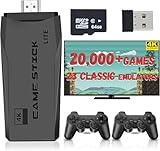
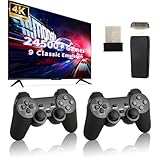
- Check controller connection type: 2.4 GHz wireless with a USB receiver is common and gives low-latency play. Watch for battery requirements and whether batteries are included.
- If you want two-player games, confirm two controllers are bundled and that the stick truly supports simultaneous play.
- Good firmware (save states, search, favourites, stable UI) matters more than flashy specs. Look for seller notes about updates and customer support.
- Included cables, length of HDMI and USB cables, and a manual reduce setup fuss.


Types and categories
Form factor
- Stick models plug directly into HDMI and are highly portable.
- Small box models sit beside the TV and can offer more ports and better cooling.
- Closed built-in library: ready out of the box with thousands of preinstalled titles.
- Expandable systems: accept TF/SD cards or USB drives so you can add ROMs and save files. Better for collectors who want flexibility.
- Standard models output 720p or 1080p. Higher-end units advertise 4K upscaling for modern TVs but that does not change original game logic.
- Processor and emulator count affect compatibility and smoothness. Look for listings that mention improved chips or smoother performance rather than only game totals.
Where to buy and retail considerations
Online marketplaces
- Large online retailers offer lots of options and customer reviews. Check seller ratings and recent reviews from Canadian buyers.
- Watch shipping times and return policy. Factor in taxes, duties and shipping fees for cross-border sellers.
- Big-box electronics or specialty game stores let you test controller feel and inspect included accessories before buying.
- In-store purchases make returns and exchanges easier if something is defective.
- Prefer sellers that offer a clear return window and responsive support. A short wait for firmware fixes is common, so good seller support is a plus.

Common mistakes to avoid and expert tips
Common mistakes to avoid
- Buying based only on the advertised number of games instead of emulator coverage and usability.
- Assuming wireless controllers include batteries. Check battery type and budget for replacements.
- Overlooking whether the device supports external storage if you plan to add titles.
- Ignoring return policy and Canadian shipping costs when ordering from overseas sellers.
- Pick a stick with 2.4 GHz wireless controllers and a USB receiver for the best balance of latency and convenience.
- Prefer models that list included emulators and mention save-state or search features.
- If you have a modern TV, choose a model with 4K or 1080p HDMI output for the cleanest picture. Expect original games to remain pixelated by design.
- Keep a dedicated USB wall adapter handy to avoid power instability from TV USB ports.
- Read recent user reviews for notes about firmware updates, controller range, and game compatibility before buying.
Final Thoughts
Choose a plug-and-play stick that matches your TV, supports the emulators you care about, includes reliable wireless controllers, and can expand storage if you want to add games. Buy from a seller with a clear return policy and Canadian shipping or easy in-store support. Use the checklist above to make a fast, confident purchase.


