



Buying Guide
How to Buy Smart Deadbolts and Keyless Door Locks
This short guide helps you choose a smart deadbolt or keyless door lock that fits your door, your smart home setup, and your budget. It highlights the most important factors, the main types on the market, key specifications to check, where to buy, common mistakes to avoid, and quick expert tips to help you act fast.
Key factors to consider before you buy
Compatibility with your door and home network is the first priority. Check door thickness and backset measurements and confirm the lock fits standard doors (about 35 mm to 45 mm thick and backsets of 60 mm or 70 mm). Decide whether you need built in WiFi for remote control or if you will use a smart home hub. Look for long battery life and easy battery type replacement like AA cells. Security certifications matter: prefer locks rated to recognized standards for residential security and durability. Finally, confirm weather resistance if the lock will be used on an exterior door.


Types available and which one suits you
- Keyless deadbolt with keypad only - good if you want simple code entry without smart home features.
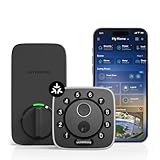
- Biometric deadbolt with fingerprint reader - fast, convenient access for multiple users and good for families; fingerprint capacity commonly ranges from about 50 to 100 entries.
- Smart deadbolt with built in WiFi - ideal if you want remote control, alerts and no extra hub. Check that it supports 2.4 GHz WiFi if required.
- Smart deadbolt that requires a hub - can offer Matter or Thread support and tighter local-network integration; you may need an additional hub or compatible bridge.
- Hybrid locks - combine fingerprint, keypad, smartphone app and mechanical key backup for maximum flexibility.
Important features, specs and expert tips
- Power and battery life - look for models that use common batteries (AA) and promise around 10 to 12 months of typical use. Confirm low battery alerts and an external emergency power option.
- Access methods - ensure the lock supports the access methods you need: fingerprint, multiple passcodes, temporary or one time codes, smartphone app access, and a mechanical key backup.
- Smart home and voice - prefer locks that work with major smart home ecosystems and voice assistants if you plan automations. Decide whether you need built in WiFi or hub based integration. Note that some features like remote unlock or automations require a hub or a home bridge depending on the lock.
- Security and durability - choose locks with recognized security ratings and a solid metal body. Weather resistance ratings such as IP65 are useful for exposed doors.
- Installation - many modern smart deadbolts install with just a screwdriver and no drilling. Check that the product lists DIY install and supports common door preparations.
- Storage limits - check how many fingerprints and codes the lock can store. If you host often or have a large household, aim for higher capacity.
- Connectivity notes - many locks require 2.4 GHz WiFi for cloud features. If you have only 5 GHz at the router, you may need a separate network or bridge.
- Quick expert tips: Buy a model with multiple unlocking options, confirm return and warranty policies before purchase, and register the product for support. Test the mechanical key backup immediately after install. Keep spare batteries and a record of admin codes stored securely.

Where to buy and common mistakes to avoid
Buy from reputable Canadian retailers or well rated online stores to simplify returns and warranty claims. Compare shipping times, warranty lengths and support options. Common mistakes to avoid:
- Buying a smart lock without measuring your door and backset first.
- Assuming every smart lock offers remote access without verifying whether a hub or built in WiFi is required.
- Neglecting to check battery type and expected runtime.
- Overlooking mechanical key backup and emergency power options.
- Purchasing without checking compatibility with your chosen smart home standards and voice assistants.
Final Thoughts
Choose a lock that matches your door measurements, gives the access methods you need, and fits your smart home setup. Prioritize certified security ratings, battery convenience and reliable connectivity. If you want quick action: measure your door now, pick a hybrid model with both fingerprint and app access, and buy from a retailer offering a clear return policy and Canadian support.


